
Bihar Bhumi: Which Portal Does What, Step by Step
Bihar Bhumi: what it covers and where the rest lives
In short: Bihar Bhumi (biharbhumi.bihar.gov.in) is the revenue department's portal for Jamabandi, mutation, bhu-lagan, LPC and Parimarjan Plus. Maps live on Bhu Naksha. Deeds and encumbrances sit on eNibandhan.
Most people searching "bihar bhumi" have one job in mind. See the record for a plot, get the map, check whether a mutation has gone through, or pay the land rent. The trouble is that Bihar spreads these jobs across several government sites, and the names sound alike. Bihar Bhumi, Bhumi Jankari, Bhu Abhilekh, Bhu Naksha, eNibandhan. Pick the wrong one and you land on a login page that cannot do what you came for.
If you are doing this because you are buying a plot or a flat with a home loan, the papers on this page are the ones most lenders' legal checks read. Butter Money's new home loan page is the next step once your land papers are clear: it helps you compare lenders for the purchase. Butter Money is not a lender, and it has no part in your land record.
Here is how I came to write it this way. While preparing this post I tried to open each official site, one after the other, on 23 October 2026. The Bihar Bhumi home page loaded on one address and came back empty on another. The Bhumi Jankari site failed with a certificate error. The Bhu Naksha page opened but only showed a button to launch the map viewer. None of that is your fault, and none of it means the service is gone. Government portals in India are slow on some days and unreachable on others. So this guide is built around tasks, not screens. It tells you which site to open and what to look for, and it says plainly where I could not confirm a click path myself.
Below: a quick-links table, what the old Bihar land words mean, then each job in turn, then what to do when a record is wrong or missing.
Quick links: which site for which job
Start here. Which official Bihar site handles which land task
| What you want to do | Where to go | What you get |
|---|---|---|
| View the Jamabandi register (Register-II) | Bihar Bhumi, "View Jamabandi Register" tile | The current land account entry for a holder or plot |
| See or download a plot map | Bhu Naksha (bhunaksha.bihar.gov.in) | The cadastral map in a map viewer |
| Apply for mutation (dakhil kharij) | Bihar Bhumi, "Apply for Online Mutation" | An online application you can track |
| Track a mutation | Bihar Bhumi, "Mutation Application Status" | Where the file stands |
| Pay land rent (bhu-lagan) | Bihar Bhumi, "Land Revenue Payment", or bhulagan.bihar.gov.in | An online land revenue payment |
| Apply for a Land Possession Certificate | Bihar Bhumi, "Apply for Online LPC", then "LPC Status" | The LPC application and its status |
| Fix an error in a digitised entry | Bihar Bhumi, "Parimarjan Plus" and its status tile | A correction request |
| See scanned old records | Bhu Abhilekh (bhuabhilekh.bihar.gov.in) | Scanned images of records |
| Check an encumbrance certificate or get a certified deed copy | eNibandhan (enibandhan.bihar.gov.in) | Registration department services |
Source: Bihar Bhumi portal, Directorate of Land Records and Survey, eNibandhan Bihar, read 2026-10-23

Which Bihar Bhumi site does what, and why they get mixed up
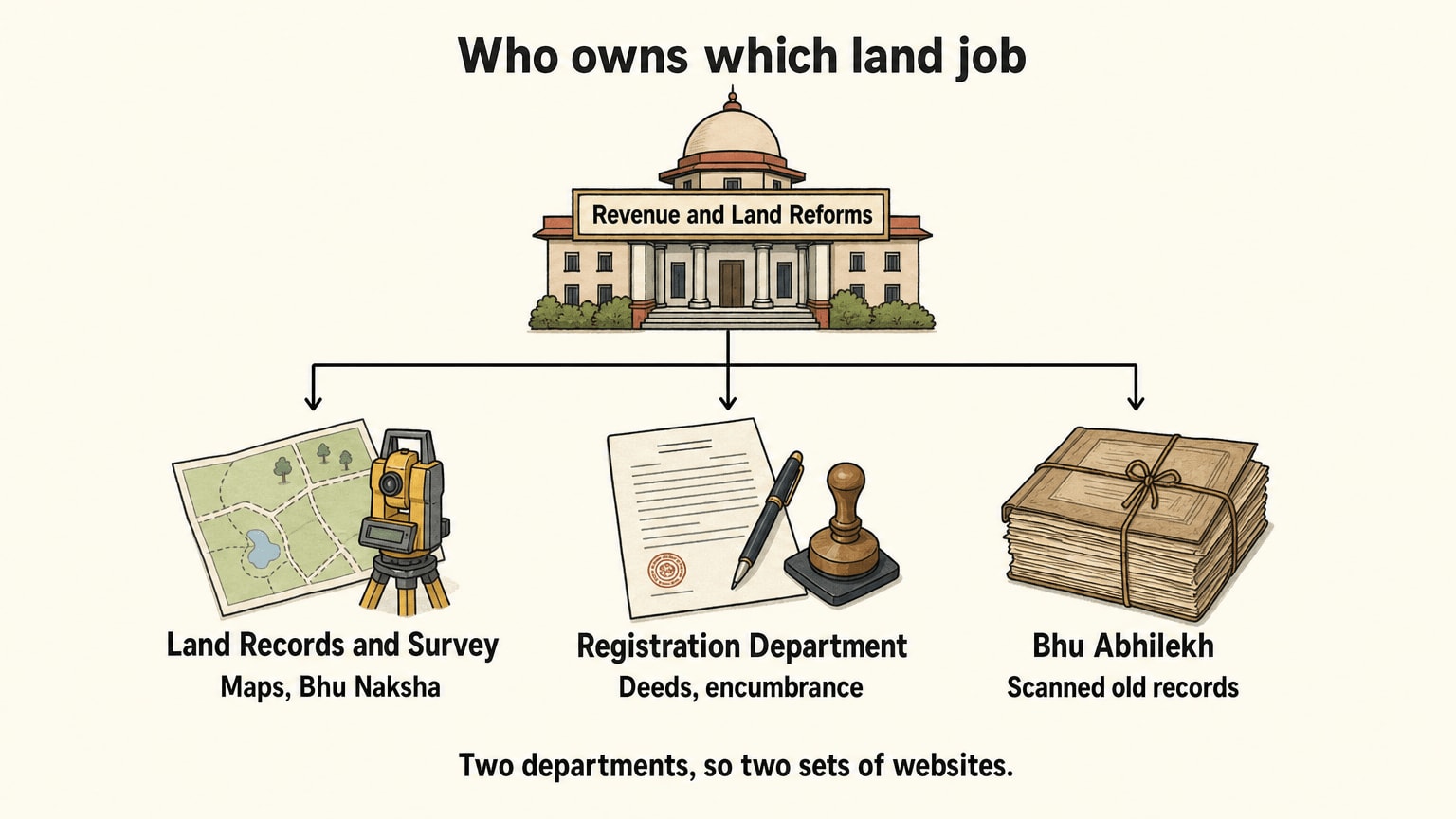
Two departments are involved, and that is the whole reason for the confusion. Land records and revenue sit with the Revenue and Land Reforms Department. Registration of deeds sits with the Prohibition, Excise and Registration Department. Once you know which department owns the job, you know which website to open.
Bihar Bhumi (biharbhumi.bihar.gov.in). This is the one most people mean. It is the Revenue and Land Reforms Department's citizen portal. The page I read on 23 October 2026 lists, among its tiles, View Jamabandi Register, Online Mutation and Mutation Application Status, Apply for Online LPC and LPC Status, Land Revenue Payment, Land Map, Parimarjan Plus and its status, e-Mapi, a View Mortgaged Land service, and a check of Aadhaar and mobile seeding status. It also has a tile for the Jamabandi in all 22 Indian languages. If your question is "what does the revenue record say about this land", start here.
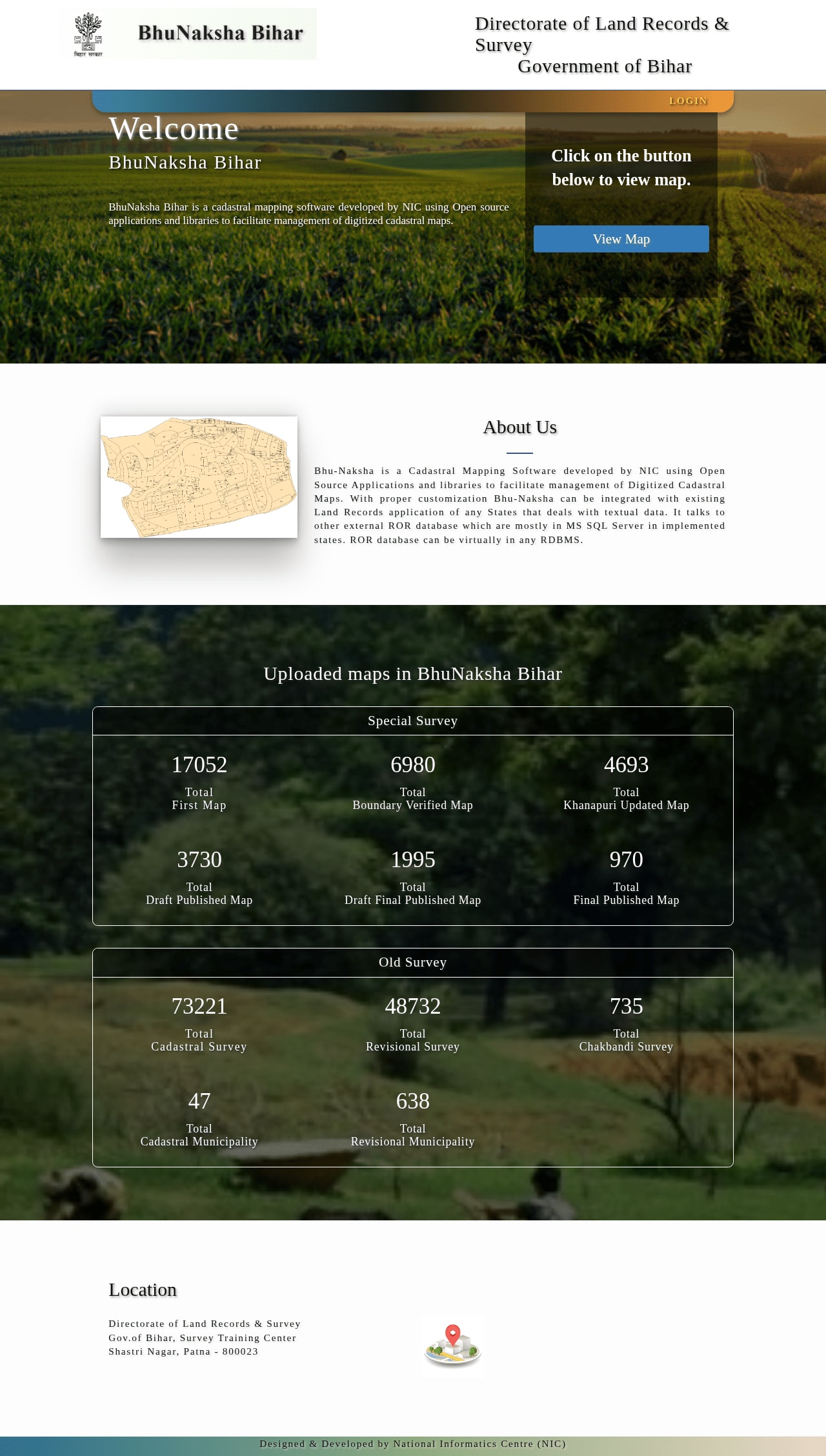
Bhu Naksha (bhunaksha.bihar.gov.in). This is the map side. The Directorate of Land Records and Survey runs it, and its own page says it was developed by the National Informatics Centre to manage digitised cadastral maps. The landing page has a button that opens the map viewer, plus counters for maps from the Special Survey and from the Old Survey. You come here for the plot's shape and boundaries, not for who owns it.
Bhu Abhilekh (bhuabhilekh.bihar.gov.in). A portal for scanned land records, with a public login, a department login and a new-user registration. Its disclaimer is worth reading. It says the data on the scanned images of the records may be treated as authentic or original, and that the data entered from those images is "for retrieval only". In plain words: if the typed entry and the scan disagree, look hard at the scan.
eNibandhan (enibandhan.bihar.gov.in). This one belongs to the Prohibition, Excise and Registration Department. It lists Document Registration, Certified Copy, Encumbrance Certificate, Online Payment, Application and Challan Status, Grievance and View Prohibited Properties. Its About page says 141 registry offices work across the state. If your question is about a sale deed or a loan or charge registered against a property, this is the department that holds it.
Bhumi Jankari (bhumijankari.bihar.gov.in). I could not open this one. Both the secure and the plain address returned a certificate error when I tried. Most guides describe it as the place to search registered deeds and look up minimum land values, but those guides are from lenders and housing sites, and I could not confirm the claim on the official page. So I will not give you a click path for it. If you need a deed or the minimum registered value for a plot, the Registration Department's own eNibandhan site is the one I could read, and the sub-registrar's office can tell you which online route is live for your district.
Bhu Lagan (bhulagan.bihar.gov.in). The Directorate of Land Records and Survey page links its "Online Lagan" service here. Bihar Bhumi also has a Land Revenue Payment tile, so the same payment can start from either place.
One more link on that Directorate page matters for the next section: its "Online Jamabandi Records" and "Online Mutation" entries both point back to Bihar Bhumi. So the revenue department's own site agrees that the Jamabandi and mutation jobs are Bihar Bhumi's.
Khata, khesra, khatiyan and Jamabandi in one table
The portal uses old revenue words, and they are not always spelled the way people say them. Searching for "khasra" when the record says "khesra" can come back empty, so copy the spelling the record uses.
I could not find an official glossary page that opened (the Bihar Bhumi page links to a revenue glossary, which is worth a look), so this table gives the common usage, as most guides and clerks use these words. Where it matters, check the meaning against the entry you are holding.
Land record words, in the plainest usage
| Word | What it usually means | Why you will need it |
|---|---|---|
| Khata | The account number a holder has under a village (mauza) | Many searches ask for it, and one khata can cover more than one plot |
| Khesra | The plot number | The map is drawn plot by plot, so this ties the map to the record |
| Khatiyan | The older survey-era record of who held what | It is the starting document the later registers grew out of |
| Jamabandi (Register-II) | The running register of holders, the area, and the rent payable | This is what the portal shows when you "view Jamabandi" |
| Mauza | The revenue village | You pick it when you search, and it is not always the same as the village name people use |
| Anchal (circle) | The local revenue office area, under a Circle Officer | Mutation and LPC applications are decided here |
| Halka | A smaller revenue unit within an anchal | A search asks for it before the village |
| Raiyat | A landholder | Some searches ask for "name of raiyat" |
Source: common usage; confirm against your own record or at the anchal office. The portal lists these services at Bihar Bhumi.
Two things in that table trip people up. First, a khata number and a khesra number are not the same thing and are rarely close in value. Using one in the other's box will always fail. Second, "mauza" and the name people use for the village are often different. If a search fails, try the revenue name on an old receipt or an older record before you give up.
Before you start: what to keep next to you
You need less than you might expect to look at a record, and a little more to apply for anything.
- The location, from district down to village. You will pick district, then anchal, then halka, then mauza, or something close to it. Know the revenue names, not just the postal ones.
- One identifier. The owner's name as written on the record, or the khata, khesra or Jamabandi number if you have an old receipt.
- A mobile number that works. The portal has a citizen login tile, and services that submit an application generally ask you to log in with a mobile number. Viewing a record is the lighter job.
- Your Aadhaar and mobile details, matching each other. The portal has a tile to check Aadhaar and mobile seeding status. If an application stalls, check that first.
- The old paper receipt, if there is one. A land rent receipt carries the khata, khesra and mauza you will otherwise have to hunt for.
A small habit saves a lot of grief. Write down the khata, khesra, mauza and anchal on one line the first time you find them. Every other task in this guide asks for some of them again.
How to view the Jamabandi Register-II
This is the job most people come for. Jamabandi Register-II is the running record of who holds a plot and what rent is payable on it. The Bihar Bhumi page lists it as "View Jamabandi Register".
The steps, in the order the portal asks for things:
- Open the Bihar Bhumi portal and find the View Jamabandi Register tile. If you read Hindi, it is the one labelled जमाबंदी पंजी देखें. There is a second tile for viewing it in all 22 Indian languages.
- Choose your location. Start with the district, then work down to the anchal, halka and mauza. Some boxes fill only after the one above is chosen, so do them in order.
- Choose how you want to search. The common choices are by the owner's name, by the khata number, by the khesra number, or by the Jamabandi number. Pick the one you actually have in front of you.
- Type what the box asks for and complete any code the page shows to prove you are a person.
- Open the result. You should see the entry with the holder's name, the khata and khesra, the area and the rent.
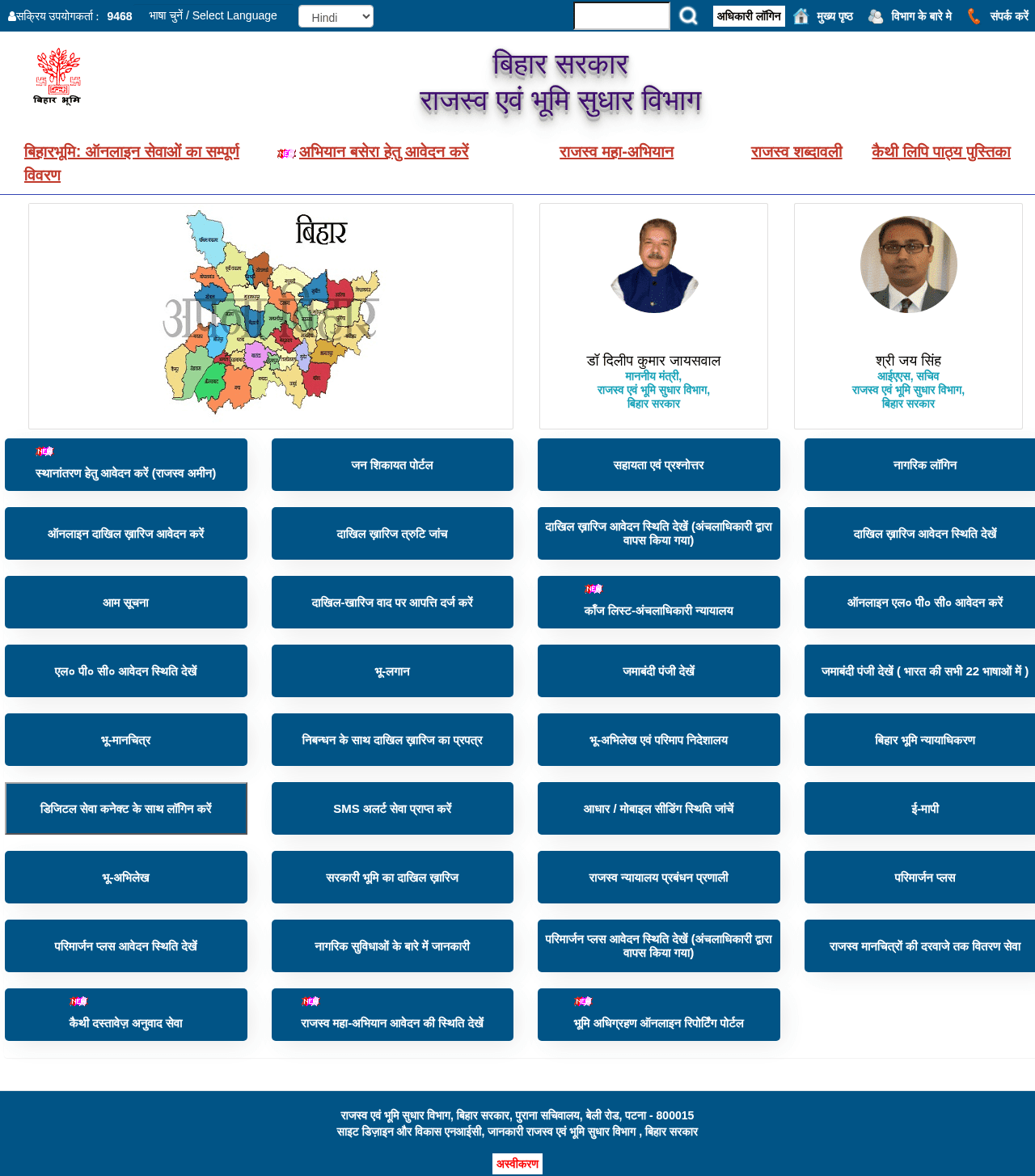
I want to be straight about step 3 to 5. I could not read the live search form, so the exact labels may differ from what I wrote. The portal's own tile list confirms the service, its place on the page and its all-languages version. The sequence, from wide location to narrow name, is how land searches in Bihar are described across the guides I read, and it matches how the revenue units nest. Follow the labels on your screen over my wording.
Search by owner name
Searching by name is the way in when you do not have the numbers. It is also the way that goes wrong most. Three things help.
First, spell the name the way the revenue record does, not the way a passport does. A name that is one word on your ID may be split in two on the register, or the other way round.
Second, remember that the register records the holder. If the land came to you through a will, a gift or an earlier sale that was never mutated, the name on the register may still be an older holder. That is not a search bug. It is the exact gap that mutation exists to close, and it is the next-but-one section.
Third, if you get a long list, narrow by using the father's or husband's name if the form offers it, or switch to the khata or khesra number once you spot a likely row.
What the printout is, and is not
What you see on screen is the digitised copy of an entry. I would treat it as a very good reference and nothing more. The Bhu Abhilekh disclaimer I quoted above makes the same distinction about retrieved data. Before you rely on it for a sale or a loan, ask the lender or the sub-registrar what form of the record they accept. Bihar Bhumi lists "Digitally signed land records" among its citizen services, so that is worth asking about, not assuming.

How to open the Bhu Naksha plot map and download it
The Jamabandi tells you who holds a plot. The map tells you where it sits, how big it looks and what it touches. Buyers who skip the map tend to find the boundary problem on the day of measurement.
Open bhunaksha.bihar.gov.in. The landing page, as I read it, does one main thing: it gives you a button to open the map viewer. It also shows counters of maps loaded under the Special Survey (first map and final published map) and the Old Survey (cadastral survey and revisional municipality). That tells you something useful. The portal holds maps from more than one survey, and a plot may be mapped under one and not the other.
Inside the viewer, the flow is the same as the record search, from wide to narrow:
- Pick the district.
- Pick the anchal (circle).
- Pick the mauza.
- Find your plot, by its khesra number or by clicking it on the map.
- Use the viewer's own print or download option to save the map you are looking at.
The viewer is a separate application that I could not open from the landing page, so I cannot tell you the download format or the exact button names. If you cannot find a download option, take a screenshot of the plot with its number visible and note the mauza and the date, which is a poor substitute but better than nothing. The department also lists a "Door Step Delivery of Revenue Maps" service on its Directorate page, for those who want a copy on paper.
A few honest cautions about maps:
- A map shows the plot as surveyed. It does not show a boundary dispute, a recent partition or a fence that has crept.
- The plot number on the map must match the khesra on the Jamabandi. If it does not, stop and ask the anchal office why.
- If you are about to pay for land, a physical measurement is a separate step. The department lists an "e-Mapi" service on Bihar Bhumi, which is the online route to a measurement request. I have not seen its steps, so ask the circle office what it needs.
How to apply for mutation (dakhil kharij) online, and track it
Mutation is the step that changes the name on the revenue record after land changes hands. A sale deed moves the ownership in law. Mutation moves the name on the register, and a lender or a later buyer will look at the register. Many people stop after registering the deed and find, years later, that the Jamabandi still shows the seller. For most buyers, mutation is the step to do soonest.
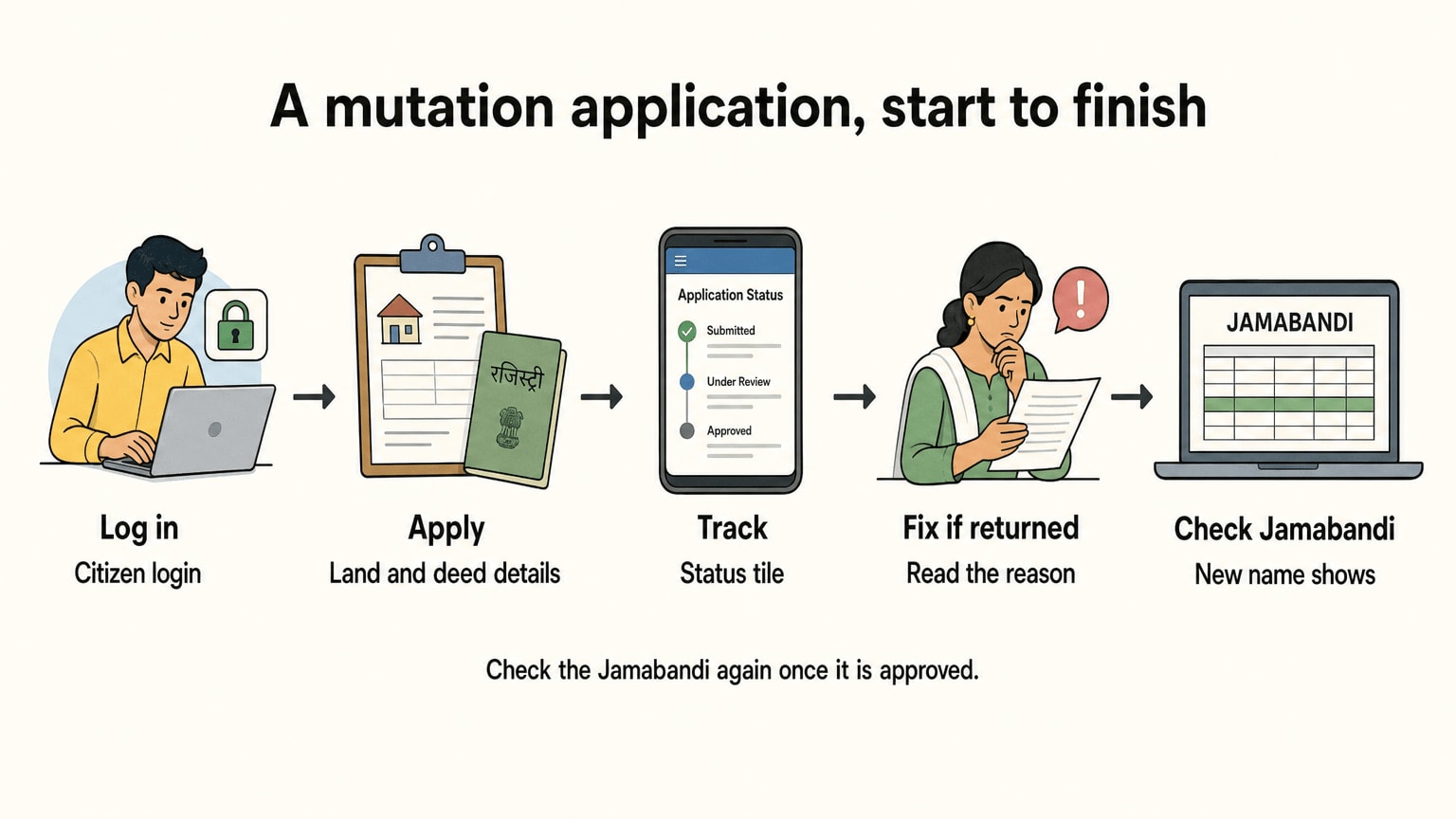
Bihar Bhumi lists these related tiles: Apply for Online Mutation, Mutation Defect Check, Mutation Application Status, a separate status tile for files returned by the Circle Officer, and Object to a Mutation Case. That list tells you the whole life of an application: you apply, the system checks it, the Circle Officer decides it, a file can bounce back for fixes, and anyone with an interest can object.
The life of a mutation application, as the portal's tiles describe it
- Log in with the citizen login, using your mobile number.
- Open "Apply for Online Mutation" and enter the land details. These are the location and the khata and khesra, and the details of the deed or event that changed the holder.
- Attach what the form asks for. For a purchase, expect the registered deed to be central. For other cases, such as inheritance, the form should ask for a different set. Read what it lists before you start, because a missing paper is the common reason for a return.
- Submit, and keep the application number. Everything after this uses it.
- Track it under "Mutation Application Status". If the status says the file was returned by the Circle Officer, go to the separate "returned" tile, read the reason, fix it and resubmit.
- Watch for objections. The portal has a tile where others can object to a mutation case. If one is filed, the case goes to the Circle Officer's court, and the portal also publishes a cause list for that court.
- When it is approved, check the Jamabandi again. It should now show the new name. If it does not, that is a correction job for Parimarjan Plus, below.
There is a Mutation Defect Check tile too. I have not seen what it asks for, but its name says what it is for. Use it before you submit if you can, so the file does not bounce back.
A word on time. I could not find an official processing time for mutation on the pages I could read, so I am not going to quote one. Ask the anchal office what it usually takes for your case, and keep the application number safe in the meantime.
How to pay bhu-lagan (land revenue) online
Bhu-lagan is the land revenue payable on a holding, and paying it keeps your record in order. It is also the job that leaves a receipt, and that receipt is a useful paper to keep. It carries the khata, khesra and mauza that you will need again.
The payment can start from two places. Bihar Bhumi has a Land Revenue Payment tile, and the Directorate's page links its "Online Lagan" service to bhulagan.bihar.gov.in. Use whichever opens for you on the day.
What to do:
- Open the Land Revenue Payment tile, or the bhulagan site.
- Find your holding the same way you would for a Jamabandi search: by location, then by the name or the numbers the form asks for.
- Check that the entry shown is yours before you pay. If the holder, the plot or the area looks wrong, do not pay against it. Raise a correction first (see the Parimarjan Plus section).
- Pay through the online payment option the page offers.
- Download and keep the receipt. Save a copy in two places.
I did not read the payment screens, so I cannot tell you which payment methods they take or what the rent per plot is. That depends on the land and on the entry, and the portal shows it against the holding.
There is one trap worth naming. Rent paid in someone else's name does not move ownership to you, and it does not make you the holder on the register. A receipt is a useful supporting paper. It is not a substitute for mutation.
How to apply for a Land Possession Certificate (LPC)
LPC stands for Land Possession Certificate. Bihar Bhumi lists it in Hindi as भूमि दखल कब्ज़ा प्रमाण पत्र. The portal has an Apply for Online LPC tile and an LPC Status tile, so the whole thing can be done and tracked online.
LPC gets its own section here because it is the service people least understand. It is useful where a Jamabandi alone may not settle things, for instance when the record is missing, out of date, or in an older holder's name. Whether a given office or lender will accept one is their call.
What an LPC is, in plain terms: a certificate that says the person named is in possession of the land as the revenue authorities see it. For most readers, the safe way to think of it is as evidence of possession, not as proof of full ownership. A lawyer is the right person to ask how it fits your particular case, because the answer depends on how you came to hold the land.
How to apply, in the order the portal lists things:
- Open Apply for Online LPC on Bihar Bhumi. You will need the citizen login.
- Fill in the applicant details and the details of the land. Expect to be asked for the location and the plot particulars.
- Attach the documents the form lists. Check the list on the form itself, because I found conflicting document lists across third-party guides and could not read the official one.
- Submit and note the application number.
- Track it under LPC Status.
I could not confirm the fee, the document list or the timeline from an official page. Different guides say different things about whether the application sits under the main Bihar Bhumi login or inside Parimarjan Plus. Since the portal lists LPC Apply and LPC Status as their own tiles, start there, and if it will not let you in, ask the anchal office which route they accept. One more thing that guides mention but I could not check: offline LPCs may be restricted in some cases. Ask before you walk in with a paper form.
Check deeds and encumbrances before you buy
This part is not about the revenue record at all. It is about what has been registered against the land. A clean Jamabandi can sit next to a charge that the Registration Department holds, and a buyer needs to see both.
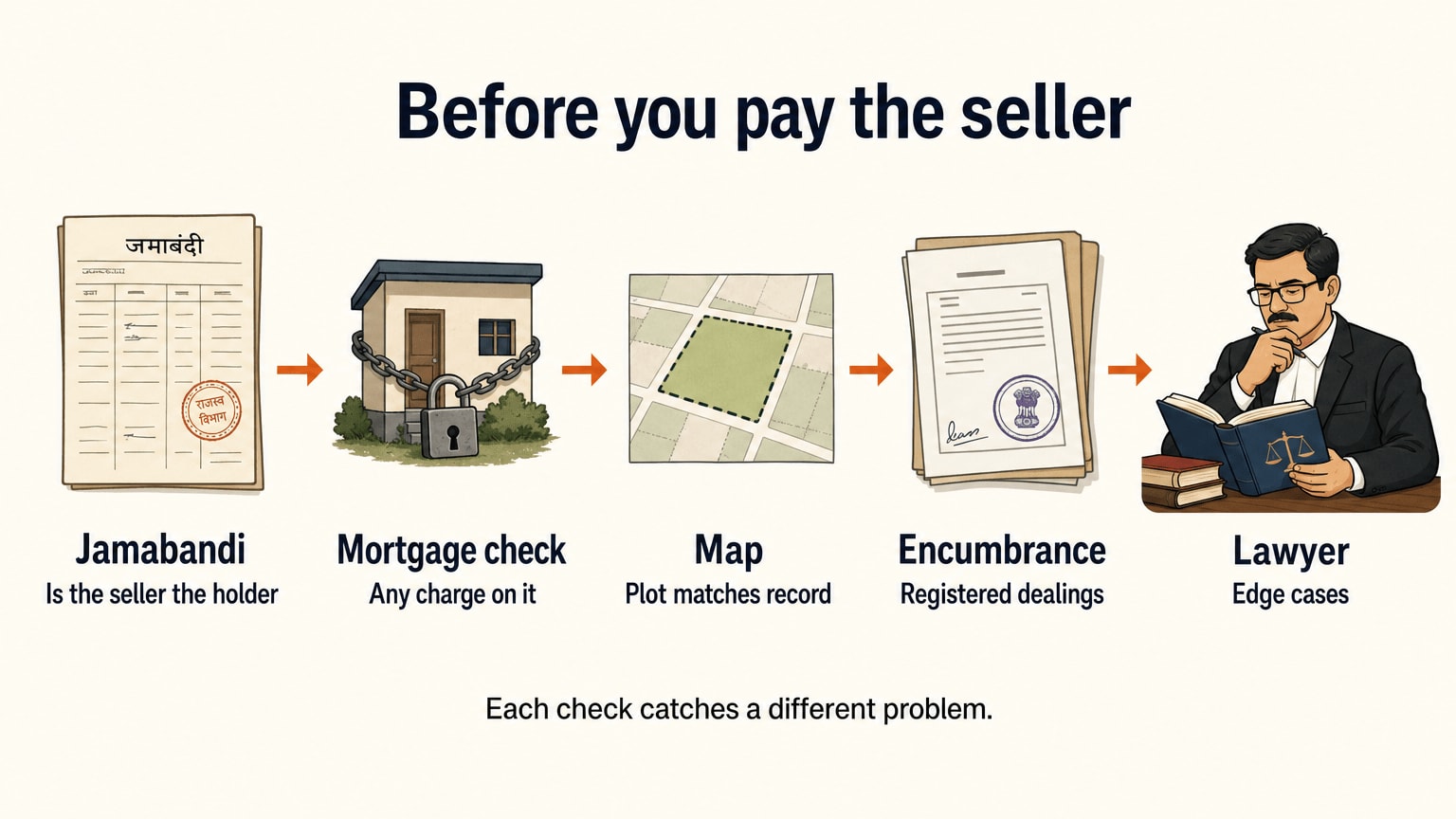
The Registration Department's eNibandhan site lists Encumbrance Certificate, Certified Copy, Document Registration and View Prohibited Properties. Bihar Bhumi also has a View Mortgaged Land service. Together, those give you a short list of checks:
A buyer's checks before paying, and where each one lives
| Check | Where | What a mismatch tells you |
|---|---|---|
| Who the register shows as holder | Bihar Bhumi, Jamabandi | The seller may not be the recorded holder, so mutation may be pending |
| Whether the plot is mortgaged | Bihar Bhumi, View Mortgaged Land | A loan or charge may already sit on the land |
| Registered transactions on the property | eNibandhan, Encumbrance Certificate | A deed or charge you were not told about |
| A copy of an earlier deed | eNibandhan, Certified Copy | The chain of ownership is not complete |
| Whether the property is on the prohibited list | eNibandhan, View Prohibited Properties | The property may not be one that can be registered |
| That the plot on the map is the plot on the record | Bhu Naksha, then Jamabandi | The numbers do not match, or the boundary is unclear |
Source: tiles and services as listed on Bihar Bhumi and eNibandhan Bihar, read 2026-10-23
An encumbrance certificate lists registered transactions over a period you choose. It will not show a claim that was never registered, such as an informal family arrangement or a verbal agreement. That is why it comes after the Jamabandi, the map and a talk with the sub-registrar, not instead of them. I could not read the encumbrance search form, so I am not giving you steps, but the eNibandhan helpdesk lists 14544 and 06123522300 if the service is not working for you.
If you are buying with a home loan, do the checks in the table before you pay the seller any advance. The lender will run its own legal check, but yours comes first. For anything contractual, a lawyer who works on Bihar property is worth paying.
How to fix an error: Parimarjan Plus
Errors in digitised records are common, and they are not your doing. Records were typed in from old registers. A name gets misspelt, a plot number is off by a digit, an area is wrong, or a mutation went through and the register never updated. The portal's answer is Parimarjan Plus, which Bihar Bhumi lists as its correction portal for digitised Jamabandi errors. It has a status tile as well, and another for files that the Circle Officer has returned.
The steps follow the same pattern as mutation:
- Open Parimarjan Plus on Bihar Bhumi and log in.
- Find the entry that is wrong.
- Say what is wrong and what it should say, and attach the paper that proves it. A deed, an old receipt or a certified copy is what usually settles it.
- Submit, and note the application number.
- Track it under the Parimarjan Plus status tile. If the Circle Officer returns it, open the "returned" tile, read why, fix it and resubmit.
How long does it take? Here the reports I read disagree, so I will tell you what each says and let you check. A Patna Press report dated 15 March 2026 says the department announced fixed timelines through an official post: clerical errors such as the name of the landholder or the father's name within 15 working days at most, technical errors such as the account number, plot or survey number and land revenue within 35 working days, and complex cases up to 75 working days. An earlier Patna Press report dated 14 December 2025 sorted the errors differently, putting plot numbers, area and land revenue in the 15 day group. Both reports say the clock counts only while the file is under scrutiny, so the days you spend answering a returned file do not count.
I did not find the department's own notification, only the news reports of it. So the safe reading is this: a small clerical fix should be quicker than a technical one, a case needing a field visit will be the slowest, and the anchal office is the one to tell you which group yours falls in. Count working days, not calendar days, and expect the clock to stop each time you are asked for something.
Tips that save a resubmission:
- Ask for one correction per application, so a hard one does not hold up an easy one.
- Attach the document that proves the right value, not just the one that shows the wrong one.
- Keep the application number. Every status check uses it.
- If a mutation is the root cause, finish the mutation first.
What to do if no record is found
You typed everything in and the page says nothing was found. Don't assume the land is not recorded. Work down this list, easiest first.
- Check the spelling. Try the name two ways. Try "khesra" if you typed "khasra". Try the name of the father or husband.
- Check the location levels. The wrong anchal, halka or mauza returns nothing. Compare with an old receipt.
- Search another way. If name failed, try the khata or the khesra number. If those failed, try the name.
- Look at the map first. Bhu Naksha can give you the plot number and the mauza when you only know where the land is.
- Try the scanned record. Bhu Abhilekh holds scanned images of records. Its disclaimer says the scanned data may be treated as authentic or original. A record that is missing from the typed search may still be there as a scan.
- Old documents in old script. Bihar Bhumi lists a Kaithi Document Translation Service, and the department publishes a Kaithi script textbook on the same page. If a family paper is in Kaithi and nobody at home can read it, that is the service to try.
- File a complaint. There is a "Raise a Complaint" link, and a Public Grievance Portal tile. Note the date and what you searched for.
- Go in person. The Circle Officer's office keeps the register, and the portal copy is a digitised version of it. A clerk can look at the physical record.
If it turns out the land was never digitised, or was digitised wrongly, Parimarjan Plus is where the correction goes. If the entry is missing altogether, ask the anchal office what route they want for it.
Helplines and where to write
The numbers I could verify, from the pages themselves on 23 October 2026:
Contacts printed on the official pages
| For | Number | Where it is printed |
|---|---|---|
| Land Records and Survey Directorate helpline | 0612-2280012 | dlrs.bihar.gov.in, labelled toll-free |
| Registration Department helpdesk (eNibandhan) | 14544 or 06123522300 | enibandhan.bihar.gov.in |
Source: Directorate of Land Records and Survey, eNibandhan Bihar, read 2026-10-23
The Bihar Bhumi page itself prints no phone number. It lists a contact-us menu and the department's address at the Old Secretariat on Bailey Road in Patna. If you write, put your application number first.
Why a lender cares about these papers
A lender doing a home loan on a plot or flat in Bihar will ask where the land stands. For most lenders that means the revenue record, the registered deed and any charge on the property. A name that does not match, a chain of ownership with a gap, or a mortgage nobody mentioned can slow a file down. None of that is about your income or your score. It is about the property.
So it helps to fix the land side before you apply anywhere. A lender's application can add a hard enquiry to your credit report, as Butter Money's free CIBIL score check post explains, and you would rather not spend one on a file held up by a record problem.
If you want to see which lenders would take your profile before you apply anywhere, the eligibility check shows offers from 40+ lenders in about 2 minutes without a hard inquiry. It looks at you, not at the land, so the land papers still go through the lender's own checks. Once you know the loan size you are aiming for, the EMI calculator post shows what the tenure does to the monthly figure. Those numbers are illustrative, and the lender sets your rate and decides on approval.
None of this guarantees a loan. It removes the delays you can control.
Common mistakes
- Mixing up the portals. Looking for a deed on Bihar Bhumi, or a Jamabandi on eNibandhan. Use the table at the top.
- Registering the deed and stopping. The deed moves ownership. The register moves only when mutation is done.
- Searching by the wrong spelling. Khesra and khasra, or a name spelt as on the passport.
- Paying rent on a wrong entry. Correct the entry first.
- Treating an LPC as a title deed. It speaks to possession as the record shows it.
- Losing the application number. Mutation, LPC and Parimarjan Plus all track by it.
- Trusting a lender's guide over the department. A guide is a place to start. Confirm on the official portal, because fees and routes change.
Frequently asked questions
What is Bihar Bhumi?
Bihar Bhumi is the citizen portal of the Revenue and Land Reforms Department, Government of Bihar, at biharbhumi.bihar.gov.in. It lists services such as View Jamabandi Register, Online Mutation, Land Revenue Payment, LPC, Parimarjan Plus and a land map link.
Are Bihar Bhumi and Bhumi Jankari the same portal?
No. Bihar Bhumi is the revenue department's portal. Bhumi Jankari is described in most guides as a registration-side site for deed searches. I could not open it on 23 October 2026 because of a certificate error, so check its current address and services before you rely on it. The registration department's eNibandhan site is the one I could read.
How do I check Jamabandi online in Bihar?
Open Bihar Bhumi, choose the View Jamabandi Register tile, pick your location from district down to mauza, and search by owner name or by a number such as khata or khesra. The exact form labels may change, so follow what is on screen. Treat the result as a reference copy.
How do I see the land map in Bihar?
Use Bhu Naksha at bhunaksha.bihar.gov.in. The page opens a map viewer, where you choose the district, anchal and mauza and find your plot. I could not read the viewer itself, so I cannot confirm the download format.
How do I apply for mutation, and how do I track it?
Log in to Bihar Bhumi, open Apply for Online Mutation, enter the land and deed details, attach the papers and submit. Track it under Mutation Application Status. A separate tile shows files returned by the Circle Officer. I found no official processing time, so ask the anchal office.
How long does a correction through Parimarjan Plus take?
Reports differ. A Patna Press report of 15 March 2026 gives up to 15 working days for clerical errors, 35 for technical ones and 75 for complex cases. An earlier report sorts errors into those groups differently. I found no department notification, so confirm your category with the anchal office.
What is an LPC, and is it proof of ownership?
LPC is the Land Possession Certificate. For most readers it is evidence that you are in possession of the land as the revenue authorities see it, not proof of full ownership. Ask a lawyer how it fits your case. Bihar Bhumi has tiles to apply for it and to check its status.
What if my land record is not found online?
Check the spelling, the anchal, halka and mauza, and try another search field. Then try the scanned records on Bhu Abhilekh and the Kaithi translation service for old documents. If it is still missing, raise a complaint on the portal and visit the Circle Officer's office, which keeps the register.
Which number do I call for help?
The Directorate of Land Records and Survey lists 0612-2280012 as a toll-free helpline. The Registration Department's eNibandhan site lists 14544 or 06123522300. The Bihar Bhumi page itself prints no number.


